
Install VB6 di windows 7 keatas
Rabu, 16 Maret 2016
0
komentar

1. Create a 0-byte file in the C:\Windows directory called msjava.dll.
2. Don't just install via the Autorun executable; instead browse the Visual Studio 6 CD (or folder), right-clickSetup.exe and select Run As Administrator.
3. On any Program Compatibility Assistant warnings, click Run Program.
4. Step through the setup screens until you're able to choose Custom Setup, then click next.
5. On the setup options, install the following items and nothing else:
- Microsoft Visual Basic 6.0
- ActiveX - Data Access
- Graphics
6. Click continue and the process will start, and (hopefully) eventually complete.
7. Skip the installations of the MSDN CD, BackOffice, VSS and SNA Server, and clear the checkbox for "Register Now". Setup should be complete.
8. Download the VB6 Service Pack 6 from http://www.microsoft.com/downloads/en/confirmation.aspx?FamilyID=A8494EDB-2E89-4676-A16A-5C5477CB9713&displaylang=en and install.
9. Change the compatibility settings for Visual Basic (to get it to run a little more smoothly under Windows 7) by browsing to C:\Program Files\Microsoft Visual Studio\VB98, right-clicking the VB6.exe file, and selecting properties.
10. On the Compatibility tab, check the following: - Run this program in compatibility mode for Windows XP (Service Pack 3) - Disable Visual Themes - Disable Desktop Composition - Disable display scaling on high DPI settings
11. When you start up the IDE, you may get a notification saying that the color scheme has been changed to Windows 7 Basic, but it will be changed back to Aero once you exit. Everything should be working fine at this point!
source : http://geekswithblogs[dot]net
Baca Selengkapnya ....






 Menu Utama
 Menu Terima Barang
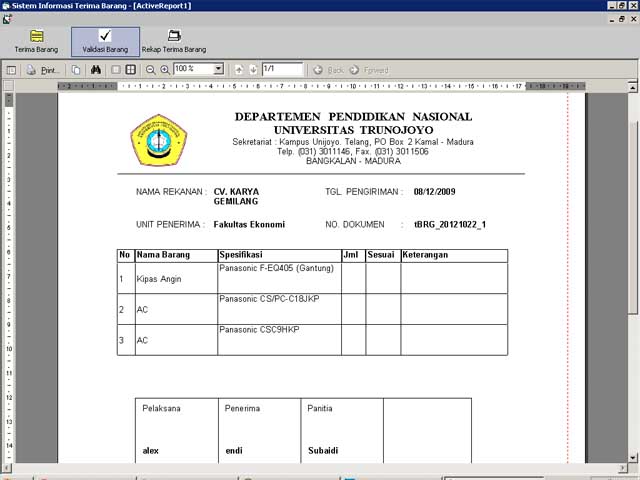 Menu PrintOut


